Cauliflower
Classifying cauliflower diseases with transfer learning
- Type
- Training notebook
- Task
- Image classification, 5 classes
- Model
- EfficientNetB3
- Built with
- TensorFlow and Keras, on Google Colab
Read it
Prefer the files? Download the EfficientNetB3 notebook (991 KB).
What the notebook does
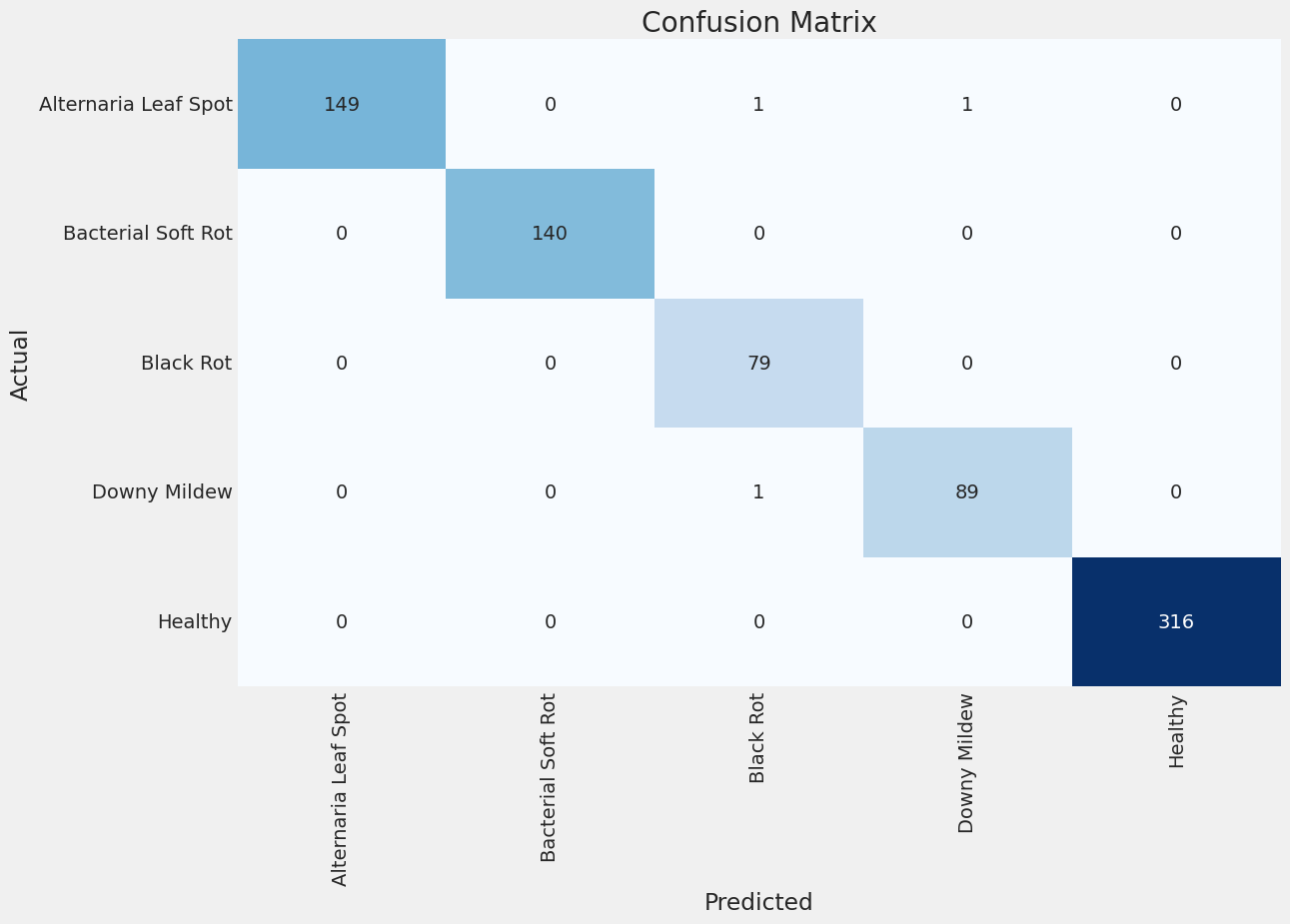
This notebook trains an image classifier that sorts photos of cauliflower into five classes: four diseases (Alternaria leaf spot, bacterial soft rot, black rot and downy mildew) and healthy plants.
The images are resized to 300 × 300 pixels and split into 6,203 for training, 775 for validation and 776 for testing. The training set is then balanced to 600 images per class: larger classes are sampled down, and smaller ones are filled up with augmented copies. The model, EfficientNetB3, starts from ImageNet weights, gets a small classification head, and trains for up to 150 epochs, keeping the best checkpoint by validation loss. The run ends with a test on the 776 held-out images: a classification report and a confusion matrix.
Where the images come from
The images were gathered from five published cauliflower datasets, all on Mendeley Data under a CC BY 4.0 licence, and mixed together for training. Where a dataset is also posted on Kaggle, only the Mendeley original is listed here.
- VegNet: An extensive dataset of cauliflower images to recognize the diseases using machine learning and deep learning models. Aditya Rajbongshi, 2022. Mendeley Data, version 3, DOI 10.17632/t5sssfgn2v.3. Licence: CC BY 4.0.
- Cauliflower Leaf Diseases: A Computer Vision Dataset for Smart Agriculture. Durjoy, Sabbir Hossain; Shikder, Md Emon; Shoib, Md Mehedi Hasan; Bijoy, Md Hasan Imam, 2025. Mendeley Data, version 1, DOI 10.17632/x995snz7p3.1. Licence: CC BY 4.0.
- Cauli-Net (Data on Cauliflower diseases and Healthy). Dank, Swapna, 2025. Mendeley Data, version 1, DOI 10.17632/y6hk67rhs5.1. Licence: CC BY 4.0.
- Cauliflower Dataset. Bendre, Anushka; Tupe, Poonam; Dixit, Vaibhavi; Kshirsagar, Vaishnavi, 2025. Mendeley Data, version 1, DOI 10.17632/x26px3xnmy.1. Licence: CC BY 4.0.
- Cauliflower Diseases Identification Image Dataset. Matin, Md Mafiul Hasan; mehedi hasan, mehedi hasan; Rahman, Sabik Ur, 2025. Mendeley Data, version 2, DOI 10.17632/c2hrwntzgh.2. Licence: CC BY 4.0.
Changes made: the images were mixed, resized to 300 × 300 pixels and split into training, validation and test sets, and the smaller classes of the training set were filled up with augmented copies. The notebooks read one combined folder, so they do not show which image came from which source. The images are not included here.
In the EfficientNetB3 notebook
- Import modules cell 0
- Resize the images cell 4
- Image paths and labels cell 7
- Balance the classes cell 9
- Augment the small classes cell 13
- Data generators cell 15
- Class distribution cell 18
- Example training images cell 20
- The EfficientNetB3 model cell 22
- A custom learning-rate callback cell 24
- The callbacks used cell 26
- Train the model cell 29
- Training curves cell 31
- Test-set predictions cell 35
- Save the model cell 37
Files and links
- EfficientNetB3_train.ipynb, the training notebook, 991 KB
SHA-256
50611680eef37185376e78acd34dab30c8b74ec7fe4c8d2320ff365ab943d370 - Source on GitHub
Good to know
- The notebook was run on Google Colab with an A100 GPU, as the file records.
- The images are not included here: the notebook reads them from a folder on Google Drive.
- The notebook is shown as it was saved: cells in file order, with the output stored in the file. Nothing is re-run here, so the numbers you see are the ones it saved.